One Impossible Number Froze a Chart, So I Followed It Into the Code
A bug report ends at the symptom. This one went on through scope, fix, and test, and shows how a tester can own a change all the way to the help text.
One impossible number landed in a chart, and the screen stopped responding. The loop that drew the chart’s axis kept subtracting a finite step from a value that was never finite, so it never got any closer to its stopping point.
The mechanism was tiny. One malformed input could keep an entire visual busy forever, and that took the rest of the screen with it.
Earlier in my QA work, a precise report might have stopped at the symptom and the shortest path to reproduce it. That’s still valuable. But the story for this one did more. It tied the symptom to its mechanism, bounded the change, listed what stayed out of scope, described the behavior that had to hold, and named the test that needed to change. A group of stories from the same stretch used that compact shape, and it’s the closest thing I have to a template for turning a visible problem into something an engineer can pick up and finish.
The fix had two parts. Reject non-finite input before it reaches the calculation, and also put a bound on the loop. Either one helps. Together they cover different assumptions. Validation keeps malformed values out of the ordinary path. The bound means a future mistake can’t turn one visual into a frozen screen.
The second part is there because validation can move. Another caller might appear. A conversion might produce a surprise. A check might get weakened in a later refactor. A loop that depends on its input always shrinking should still have a limit on how much work it’s willing to do.
This is a choice my tester’s instinct understands right away. Don’t only repair the example that reached the screen. Protect the assumption that allowed the example to become unbounded.
Don’t only repair the example that reached the screen. Protect the assumption that allowed it to become unbounded.
Small scope doesn’t mean one line. It means every changed line serves the same user-visible promise. Here, the promise was that bad optional data should degrade one visual instead of trapping the whole screen. Rebuilding unrelated chart behavior would have made the retest murkier and the change harder to read, so that went under out-of-scope.
The acceptance checks follow the two defenses. Hand the formatter a non-finite value and confirm it never enters the normal calculation. Run the loop with input that can’t converge and confirm the bound ends the work. Then keep an ordinary finite case, to show the valid path still renders the way it did before. That last case is easy to skip because it’s undramatic, but it’s what stops defensive code from “fixing” the problem by refusing every input.
A different bug from the same stretch showed why the mechanism matters. A queued save captured what the screen held after an earlier request finished, including a later change the server hadn’t accepted. When the queued save failed, the rollback restored the rejected value while the message said the change hadn’t been saved.
The visible contradiction was simple: the message and the screen disagreed. The cause involved time and identity. The rollback needed the snapshot belonging to that request, not whatever happened to be on screen when the response came back.
It’s the same habit I used on mobile, carried deeper into the code. Ask what the screen shows now. Ask which state produced it. Change the order. Wait for one action to finish, move to another state, then see whether the response still applies to the thing that started it. On mobile that meant a saved attachment with no icon until refresh, or an app exit I could reduce to a short path. Those reports were useful because they were precise. What changed is that I kept following the question after the reproduction was stable: where did the state split, which decision allowed it, and what’s the smallest correction?
I wasn’t the only person on these stories, and I won’t claim every design started with me. What I can describe is the method. Start at the user-visible failure. Reduce it until it’s repeatable. Read enough code to find the decision that can’t make progress or the snapshot that belongs to the wrong moment. Bound the fix. Write the bad case alongside the change. Keep the normal case so defensive behavior doesn’t replace ordinary behavior.
The clearest example of ownership, though, isn’t a bug. It was a flow that recognizes when the assistant should guide a person to the right next place and hand them off cleanly. I owned it through routing and a verified catalog of destinations, then through the how-to content people actually read, which was reviewed and signed off. Next-step recall in our evaluation went from 87% to 94%.
How do I add a new client?
I can take you there. Here’s the link to the page for adding a client, and the steps once you arrive.
The verified catalog is why that link can be trusted. The assistant picks from destinations that have been checked, so it isn’t making up places to send people. And the how-to content is where the whole thing either helps someone or doesn’t, because that’s the part a person reads. Demoing features like this and hearing from users directly was part of the job too.
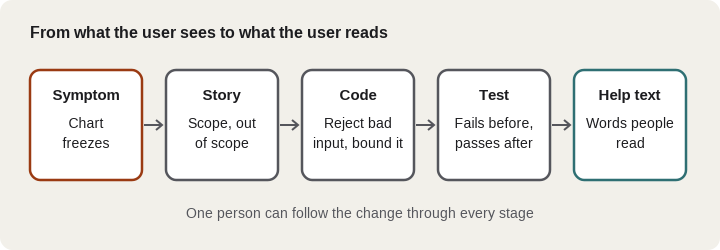
A feature like that comes down to a few plain questions. What did the user ask? Where did the answer send them? Does the destination exist? Could a new person follow the explanation when they got there? The spec, the code, the test, and the help text each answer one of them.
That also changes what a handoff looks like. A reproduction says where to start. A bounded story says which behavior the change protects. A failing test lets another engineer see the same mechanism without rebuilding the investigation. Even when the implementation is shared, those three keep the user’s symptom connected to the code under review, and they keep the retest short.
The method isn’t specific to arithmetic. A response can be partial, a state update can arrive late, a local value can outlive the screen that created it, or a label can describe the wrong number. The mechanism changes, but the questions stay oddly stable. What did the user see? What should have happened? Which state or decision made those diverge? What’s the smallest safe behavior I can state? Which deliberately bad input will make the test fail before the correction?
Before the change, one malformed number could hold the chart still. After it, the visual can decline the impossible input and leave the rest of the screen working for the person using it. But not every symptom reduces to a number. What does the path look like when the screen shows a sentence the assistant got subtly wrong?